W09 Exercise: Next Steps
- Due No due date
- Points 35
- Questions 2
- Time Limit None
- Allowed Attempts Unlimited
Instructions
Overview
In this activity, you will begin the next steps of your educational journey. Review this semester-long work in W03 Next Steps Information.
Reach out to your instructor if you have any questions. This quiz gives you a chance to report on your progress so far.
Instructions
-
Engage with Some Academic Planning Tools and Reflect. Open Degree Planner, as linked under “Academic Planning” on your student portal. Try out the tool. Note that this tool is still under development, may not be available in a given week, and may have some bugs from time to time. If you can get into this tool, your activity there will help the programmers know how it is working so they can make improvements. If you don’t find it on your student portal, or it is not working, move on to the other tool. The other tool is found at the bottom of this page on the BYU-Pathway Worldwide Website. This section of the page is called “Degree Options: Customize Your Degree.” Try it out. Above the degree diagram are links to explore each certificate and associated courses. Look at some of those. Consider the following reflection questions:
- Did you get any insights from your use of at least one of these tools?
- Can you see that there are some certificates that need to be taken before others?
- Consider the pace you would have to go to complete a bachelor’s degree. Is it fast enough for you?
- Did you find anything surprising?
- Consider how all of this information can help you as you plan for your academic future.
-
Continue to work for admission through BYU-Pathway Worldwide.
Continue to work on an application to earn a degree online through BYU-Pathway Worldwide, which is developed and granted by BYU-Idaho. Click here to read more and to apply. Work as fast as you can on this. If you are planning on doing something else after PathwayConnect, work on the Alternate Assignment.
NOTE: There are several screens in the application. When you see the “School Selection” screen, be sure to select BYU-Pathway Worldwide if you desire to complete a degree online. All other applications are for on-campus admission only, and students must meet each school’s campus admission requirements.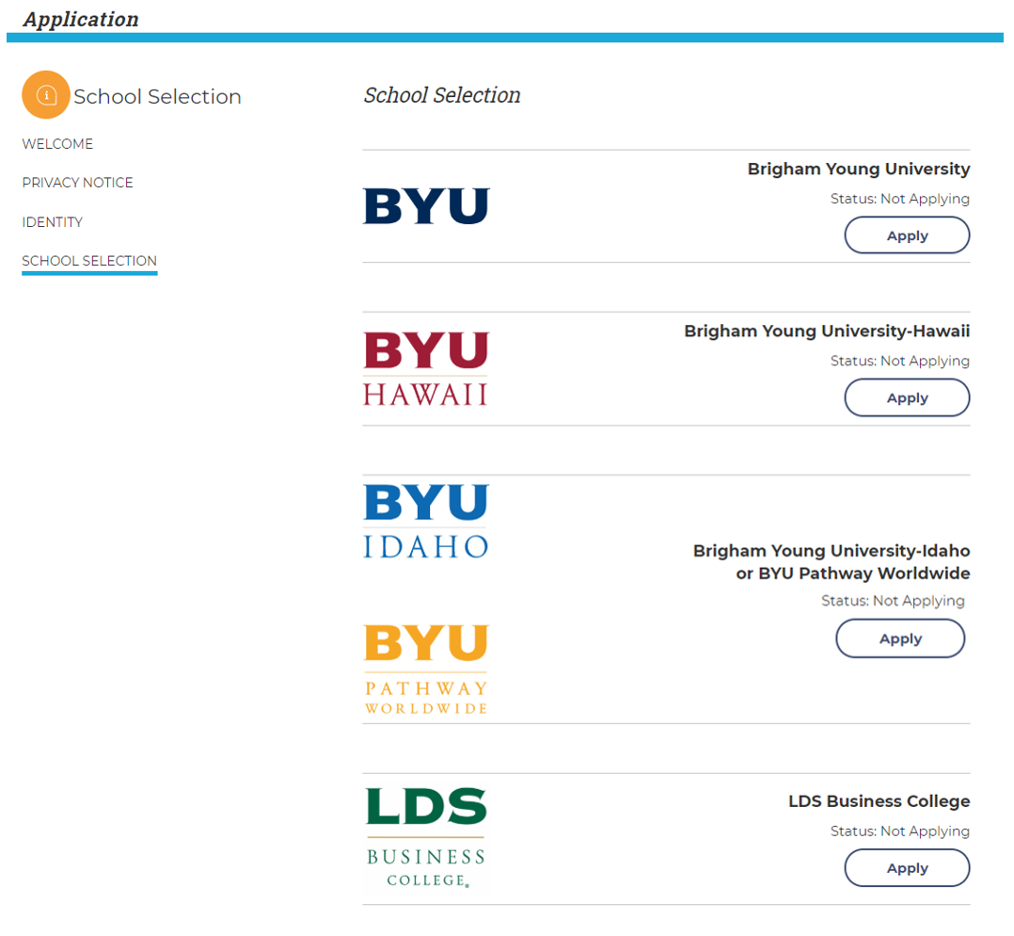
- Complete this survey to honestly report that you completed these next steps.
Only registered, enrolled users can take graded quizzes